sparksbud
Immersive 360° world
The Garden
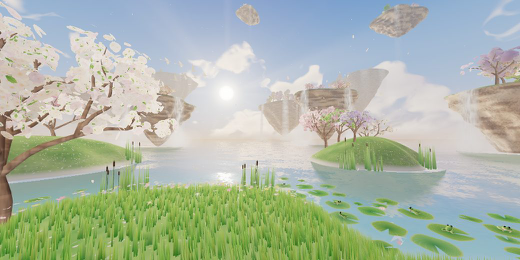
A 360 conservatory of glass flowers, butterflies, floating lilies and flowing light above open water.

What is around you
Branching vaults, veined canopy leaves, pearl strands, breathing flowers, glass butterflies, petal fall and a crown of flowers surround a dense water garden.
How it moves
The observer stays among the plants as flowers breathe, the canopy sways, seeds flow and ripples cross the water.
What you can do
This world has no separate scene action; it is designed for a slow, free look around the conservatory.
Music
Petals in the morning offers soft celesta and spacious major harmony when music is enabled.
Controls
Drag or touch to look around; the arrow keys turn the view and R returns to the opening direction. Space pauses motion, M starts or stops music, F enters fullscreen, and the settings control changes motion speed and brightness.
Browser and device
A current browser with WebGL 2 and graphics acceleration is required. On a compatible WebXR browser, including Meta Quest Browser, the app can offer Enter VR.
- Price and account
- Free to enter. No account or sign-up.
- Installation
- Runs in the browser; there is no app to install.
- Comfort options
- Music is off until you choose it. Reduced-motion visitors begin paused, and the app lets you pause motion or lower brightness and motion speed. Read the light, motion and VR notes in the Terms before entering if those effects may be uncomfortable. Terms
Frequently asked questions
How do I explore The Garden in VR on Meta Quest or Apple Vision Pro?
On Meta Quest, open Meta Quest Browser, visit https://sparksbud.com/?view=360&world=elysian, and choose Enter VR. Safari on Apple Vision Pro supports WebXR too, though Sparksbud has not been tested on that device yet. No download or installation is needed.
Is The Garden free to enter?
Yes. The Garden is completely free with no account creation, sign-up, subscriptions or adverts.
Can I experience The Garden without a VR headset?
Yes. You can explore on any computer, phone or tablet in a WebGL 2 browser. Drag or touch to look around in 360 degrees, and use Space to pause or M to play music.
What comfort options are available?
On a computer, Space pauses motion. In every view you can lower the speed and brightness in settings, and visitors who prefer reduced motion begin paused. Music is off until you turn it on.