sparksbud
Immersive 360° world · Beta
Terrace Rain
A red paper umbrella over flooded rice terraces in 360 degrees, while a mountain shower comes and goes.
Beta world: Terrace Rain is in active development. You may encounter visual or audio glitches. If you spot an issue, please
Report a bug
Thanks, got it!
What is around you
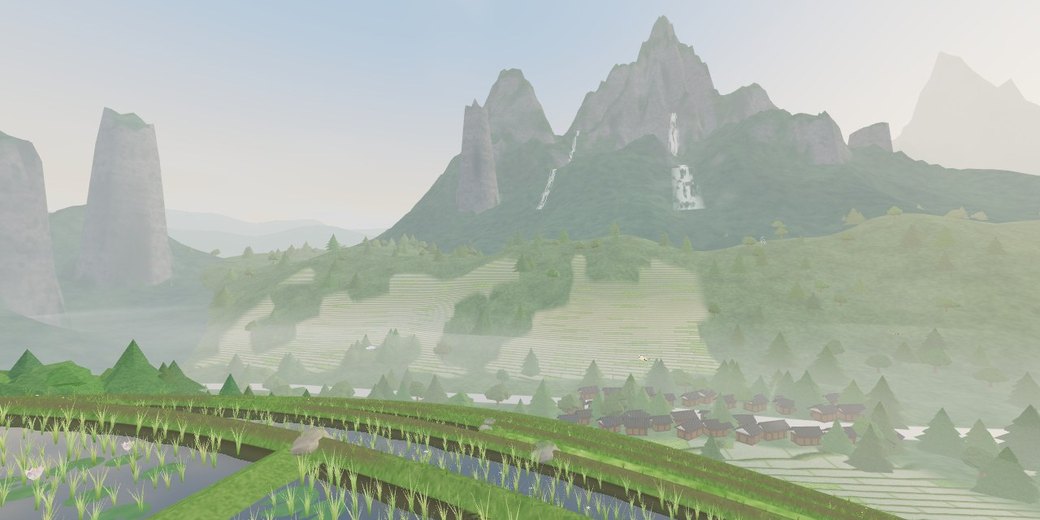
Terraced green paddies step down into a misty mountain valley, with young rice swaying, a stone pagoda and lantern, a quiet pond with water lilies, a bamboo knocker, and a cup of warm tea on a low stone table beside your seat. Pine forests climb the slopes toward great tumbling waterfalls and cloud-veiled peaks.
How it moves
You sit peacefully beneath a wide oiled-paper umbrella on a stone dyke while the weather, birds, mist, and distant waterfalls move around you. Turn freely in 360 degrees on any device; pause holds the rain and motion while keeping look controls active.
What you can do
Tap, press E, or use the weather action to advance the sky: watch drizzle turn to steady rain, ease into a thinning mist, or welcome the warm sunbreak and rainbow across the valley.
Music
After the shower brings warm plucks, the soft rhythm of rain on paper, and the distant knock of bamboo once sound is turned on.
Controls
Drag or touch to look around; the arrow keys turn the view and R returns to the opening direction. Space pauses motion, M starts or stops music, F enters fullscreen, and the settings control changes motion speed and brightness.
Browser and device
A current browser with WebGL 2 and graphics acceleration is required. On a compatible WebXR browser, including Meta Quest Browser, the app can offer Enter VR.
- Price and account
- Free to enter. No account or sign-up.
- Installation
- Runs in the browser; there is no app to install.
- Comfort options
- Music is off until you choose it. Reduced-motion visitors begin paused, and the app lets you pause motion or lower brightness and motion speed. Read the light, motion and VR notes in the Terms before entering if those effects may be uncomfortable. Terms
Frequently asked questions
How do I explore Terrace Rain in VR on Meta Quest or Apple Vision Pro?
On Meta Quest, open Meta Quest Browser, visit https://sparksbud.com/?view=360&world=rain, and choose Enter VR. Safari on Apple Vision Pro supports WebXR too, though Sparksbud has not been tested on that device yet. No download or installation is needed.
Is Terrace Rain free to enter?
Yes. Terrace Rain is completely free with no account creation, sign-up, subscriptions or adverts.
Can I experience Terrace Rain without a VR headset?
Yes. You can explore on any computer, phone or tablet in a WebGL 2 browser. Drag or touch to look around in 360 degrees, and use Space to pause or M to play music.
What comfort options are available?
On a computer, Space pauses motion. In every view you can lower the speed and brightness in settings, and visitors who prefer reduced motion begin paused. Music is off until you turn it on.